Android Application for the Lecher Antenna


Android Application
In order to simplify the research for markers associated to the Lecher antenna, I've developed a small free application for Smartphone and tablet which turn under Android.
Due to its simplicity it's compatible with all the versions from v2.2 of the android system. It has no need for any particular authorization.
Using it, you'll be abble to look for a marker associated with a key-word, a reference or a category.
The application contains initially all the values posted on my site, but you can include your own.
Do not hesitate to install it on your devices by visiting the Google Play Store
.
Google Play Store
.
Due to its simplicity it's compatible with all the versions from v2.2 of the android system. It has no need for any particular authorization.
Using it, you'll be abble to look for a marker associated with a key-word, a reference or a category.
The application contains initially all the values posted on my site, but you can include your own.
Do not hesitate to install it on your devices by visiting the
Google Play Store
.
How to use the search screen
Having installed the application, during its first launch, it will show you a small note.
Then, you'll see its first screen, the main screen, where you will find three criteria of research:
The title criteria allows you to seize one or several letters in touch with what you are looking for, for examples:
The marker criteria allows you to seize a value of marker in touch with what you're looking for. As examples:
The category criterua allows you to indicate a category, a family of markers in touch with what you're looking for. For examples: .
.
Then, you'll see its first screen, the main screen, where you will find three criteria of research:
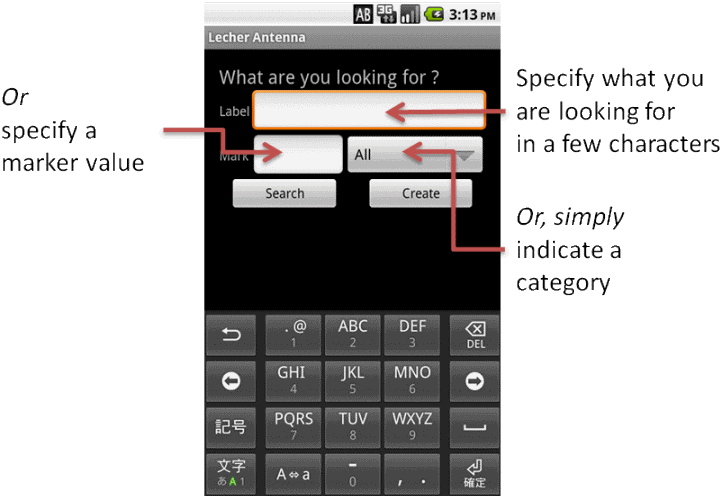
The title criteria allows you to seize one or several letters in touch with what you are looking for, for examples:
- ir, will find all the references containing letters ir in the title of the marker, this will give the following result Hair, Iron, ....
- gold, will find all the references containing letters gold in the title of the marker, so it'll find Structure in accordance with the Gold Number and Gold
The marker criteria allows you to seize a value of marker in touch with what you're looking for. As examples:
- 1, will find all the references going from 1.0 to 1.999.
- 14.3, will find all the references going from 14.0 to 14.999.
The category criterua allows you to indicate a category, a family of markers in touch with what you're looking for. For examples:
- All, means no category or all the categories.
- Personal, will find all the references to the markers which you created, whatever their family is.
- Other, will find all the references to markers belonging to the Other family (for example Black Color)
- Geobiology, will find all the references to markers belonging to the family Geobiology (for example Water)
- Medical, will find all the references to markers belonging to the Medical family (for example Ears)
.
The results
If results where found, they'll be displayed below the criteria:
Every element will have a color indicating its category (its membership):
You can navigate in the results by making the list slide from bottom to top.
You can select a value by clicking on it, the detail screen will open.
You can also redo a search, by changing your criteria.
If no result corresponds to your need, you can create a new value by pressing the button .
.
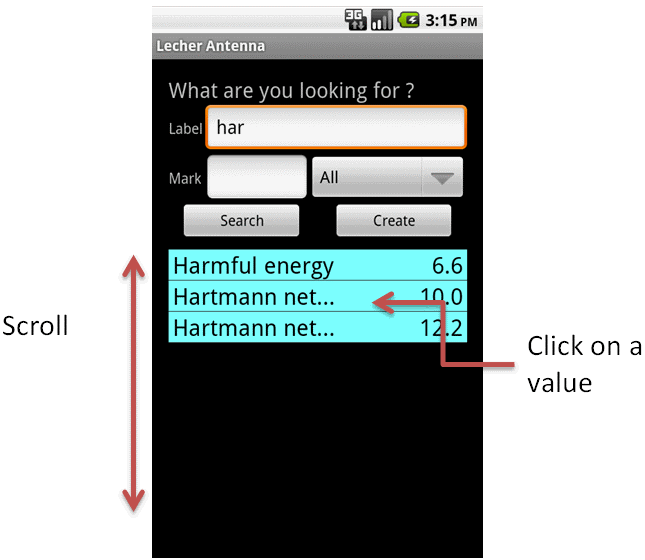
Every element will have a color indicating its category (its membership):
- Blue for a value belonging to the Geobiology group
- Green for a value belonging to the Medical category
- White for a value belonging to the Other group
- The text will be red if the value is a member of the Personal category (created by you)
You can navigate in the results by making the list slide from bottom to top.
You can select a value by clicking on it, the detail screen will open.
You can also redo a search, by changing your criteria.
If no result corresponds to your need, you can create a new value by pressing the button
.
Detail Screen
By pressing on one of the values presented during the display(posting) of the result(profit) of your search(research), you will arrive on this screen:
You will find, the title, the marker(scorer), the category, there as well as a small description.
If it is a:
This software uses descriptions coming from:
If you want to go back to the research screen simply press the back button of your device .
.
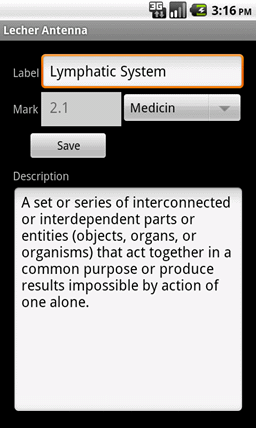
You will find, the title, the marker(scorer), the category, there as well as a small description.
If it is a:
- personal value (created by you), can modify all the information or simply delete it.
- not personal value (present by default), you can modify the title, the description and the category but not the marker. You cannot either delete it.
This software uses descriptions coming from:
- Wikipedia
- Futura-sciences
- Larousse
- Dictionnaire Doctissimo
- Horizon Tantra
- Esopedia Urobore
- Medical Dictionary The Free Dictionary
If you want to go back to the research screen simply press the back button of your device
.
Create a new marker
You can create your own markers by clicking the button which is situated on the
search screen (first screen of the application).
By clicking it, a new empty detail screen will appear, in it you'll be able to specify: button so that your data will be saved.
All the markers which you will have created are available in the Personal category and in the category of creation.
They'll appear in red during the searches.
Important: in its current version ( v1.0 ), the application saves your data on the device where it is executed. This implies that your information is not shared with other devices. For example if you have a phone and a tablet, they will not exchange any information, the information on your phone is independent from information on your tablet.
button which is situated on the
search screen (first screen of the application).
By clicking it, a new empty detail screen will appear, in it you'll be able to specify:
- A title: mandatory, which represents the sense of the marker.
- A marker: mandatory, which indicates the value on which to settle the Lecher antenna during the researches.
- A category: mandatory, which represents the family of your marker.
- A description: optional, which will give details of your marker.
button so that your data will be saved.
All the markers which you will have created are available in the Personal category and in the category of creation.
They'll appear in red during the searches.
Important: in its current version ( v1.0 ), the application saves your data on the device where it is executed. This implies that your information is not shared with other devices. For example if you have a phone and a tablet, they will not exchange any information, the information on your phone is independent from information on your tablet.
Options / preferences
By clicking on your option button (3 white vertical square in the top-right corner of the screen) of your phone, you'll be able to change some options.
Available options:
Available options:
- Length of the wire: represents the length of your Lecher wire in cm, a standard antenna has a lecher wire of 20,05cm.
- Location of the zero: indicates where is the zero, up or down. In a standard Lecher antenna the zero is at the top of the antenna.
- Unit used: Marks can be seen in cm or feet.
- Search gaps: specify the gaps between the searched value and the result of the search.
- Length of title: specify the number of characters that can be seen in the search screen.
Algorithme
If your antenna does not have the standard length (20.05cm) after changing the options the following algorithm will be used:
- Sample, we'll take an antenna of 30cm length with the zero on top.
- We'll look for the north; the standard mark is 5.7 cm (antenna of 20.05cm with zero on top).
- We invert the mark: 20.05 - 5.7 = 14.35 cm, standard mark as if zero was at bottom.
- This value is ok for a 30cm antenna(or any antenna), so, if zero was at bottom we'll stop here, but zero is on top.
- So we invert the value: 30 - 14.35 = 15.65 cm that is the correct value for a 30 cm antenna with zero on top.